Why Did My WebRTC Connection Fail?
When I was an Android Java mobile application engineer before transitioning to a backend engineer, I once developed a real-time voice communication service. I built a mobile application on the Android Java platform, developed a REST API server, and set up a COTURN streaming server for real-time audio exchange. It was a constant struggle, filled with trial and error, but in the end, I successfully launched the service. Looking back now, I realize that what seemed like “pain” at the time wasn’t as difficult as I had thought.
Of course, for “adventurers” just starting their journey with WebRTC, it can be quite overwhelming. Before setting it up, one must face numerous doors, behind which lurk “monsters” like NAT, firewalls, and AWS security groups. Defeating them can be incredibly challenging at first — at least until you’ve leveled up.
After reading a Medium post by Kartik Tomar, I was impressed by how well it explained WebRTC in a way that even beginners could understand. It also reminded me of my own experiences setting up WebRTC protocols in the past. So, I decided to write this post, hoping that it might help new WebRTC adventurers on their journey.
What is WebRTC?
WebRTC (Web Real-Time Communication) is an API designed for real-time communication between web browsers. It is commonly used for voice calls, video calls, and peer-to-peer (P2P) file sharing. According to its official website, webrtc.org, the goal of this project is to enable the development of high-quality RTC (Real-Time Communication) applications for browsers, mobile platforms, and IoT devices while ensuring interoperability through a common set of protocols.
Although WebRTC is often referred to as a browser API, it also provides an Android SDK. I was able to implement WebRTC using this SDK at the time.
As an open web standard, WebRTC can be accessed through JavaScript APIs in all major browsers. For native clients, such as Android and iOS applications, libraries offering the same functionality are available, as mentioned earlier. The WebRTC project is open-source and is supported across multiple browsers and platforms.
Unlike traditional communication methods, WebRTC transmits data primarily via UDP. However, depending on the configuration, TCP may also be used.
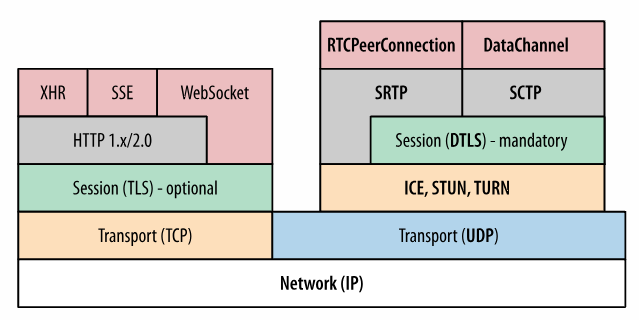
Above is the protocol stack of WebRTC. While the stack includes various complex components such as DTLS, which is used for encrypting peer-to-peer data transmission, the key element is ICE (Interactive Connectivity Establishment).
ICE, along with STUN (Session Traversal Utilities for NAT) and TURN (Traversal Using Relays around NAT), is essential for establishing peer-to-peer connections over UDP. STUN and TURN will be explained in the followings, but first, let’s take a closer look at what ICE is.
ICE (Interactive Connectivity Establishment)
ICE (Interactive Connectivity Establishment) is a framework used in WebRTC and various other technologies to connect two peers, regardless of network configurations. It is primarily used for establishing peer-to-peer connections, such as in audio and video chats.
This protocol allows peers to discover each other beyond NAT (Network Address Translation) by sharing their local and global IP addresses. In other words, it enables communication even when devices are behind different networks.
ICE gathers all available connection candidates, including local IP addresses, STUN-derived addresses, and TURN relay addresses. These are collectively known as ICE candidates. For instance, in the Android SDK, objects such as IceCandidate are provided to facilitate the use of this protocol. Once all candidates are collected, they are transmitted to the remote peer via SDP (Session Description Protocol).
SDP (Session Description Protocol)
SDP (Session Description Protocol) is a standard used to define the details of a peer-to-peer connection. Although it is called a “protocol,” it is not actually a protocol in itself but rather a format that describes connection parameters.
SDP contains information such as audio and video codecs, ICE candidate details, and other necessary configurations. One peer generates an SDP message and sends it to the other peer to establish a connection.
SDP follows a specific structure, as shown below. No need to dive too deep into it right now — just keep it in mind as a reference.
v=0
o=who 2909090909 2909090909 IN IP4 host.xxxxxx.com
s=
c=IN IP4 host.xxxxxx.com
t=0 0
m=audio 49170 RTP/AVP 0
a=rtpmap:0 PCMU/8000
m=video 51372 RTP/AVP 31
a=rtpmap:31 H261/90000
m=video 53000 RTP/AVP 32
a=rtpmap:32 MPV/90000
NAT (Network Address Translation)
This is where things get really important.
First, there’s a key assumption: “Internet access requires a single public IP address.” NAT (Network Address Translation) allows multiple devices to access the internet using a single public IP address. To make this work, private IP addresses need to be translated into a public IP address.
Think of it like going through airport security. You can’t just walk straight to the boarding gate — you need to show your ID and boarding pass to prove who you are and that you have permission to fly. Similarly, every device on a network has a private IP address, but that alone isn’t enough to access the internet. You need at least one public IP address so that external devices can find and communicate with yours.
GPT explains it like this:
❓ Why need public IPs for internet connection?
A public IP address is required for your device to communicate directly over the Internet. It serves as a unique identifier, enabling other devices on the Internet to locate and connect to yours. …
Yes. And the process responsible for that conversion is NAT (Network Address Translation).
Simply put, NAT translates one or more local IP addresses into one or more global IP addresses (or vice versa) to enable internet access for local hosts. It also modifies port numbers in packets being routed to their destination. In other words, it masks the original port number of a host by assigning a different one. Then, it creates an entry in the NAT table, mapping the IP address and port number. NAT typically operates on routers or firewalls.
In most cases, a border router (a.k.a. edge router) is configured to handle NAT.
A border router is a router that has one interface in a private network and another in a public network. Simply put, it acts as a gateway or translator between the two networks, managing the flow of traffic and handling address conversions at the boundary.
When a packet passes out of the private network, NAT translates the private IP address into a public IP address. Conversely, when a packet enters the private network, NAT converts the public IP address back into a private IP address.
STUN (Session Traversal of UDP through NATs)
The STUN protocol helps a client determine its public address, the type of NAT it is behind, and the internet-facing port associated with a specific local port by the NAT. This information is used to establish UDP communication between peers.
STUN works with full-cone NAT and port/address restricted NAT, but it doesn’t work with symmetric NAT because the NAT mapping table changes dynamically. One major advantage of STUN is that it has low maintenance costs.
TURN (Traversal Using Relays around NAT)
In most WebRTC applications, if clients are not on the same local network, establishing a direct P2P connection is often impossible. One of the main reasons for this is that NAT (especially symmetric NAT) or firewall devices block direct traffic between peers.
In such cases, data is routed through a TURN (Traversal Using Relays around NAT) server, which acts as a public relay server to facilitate the connection.
II. How did I build it?
Looking back, the structure of the voice streaming service I built was roughly as follows:
At its core, there was a REST API server for handling CRUD operations, along with a WebSocket (Socket.io) signaling server and a Coturn server.
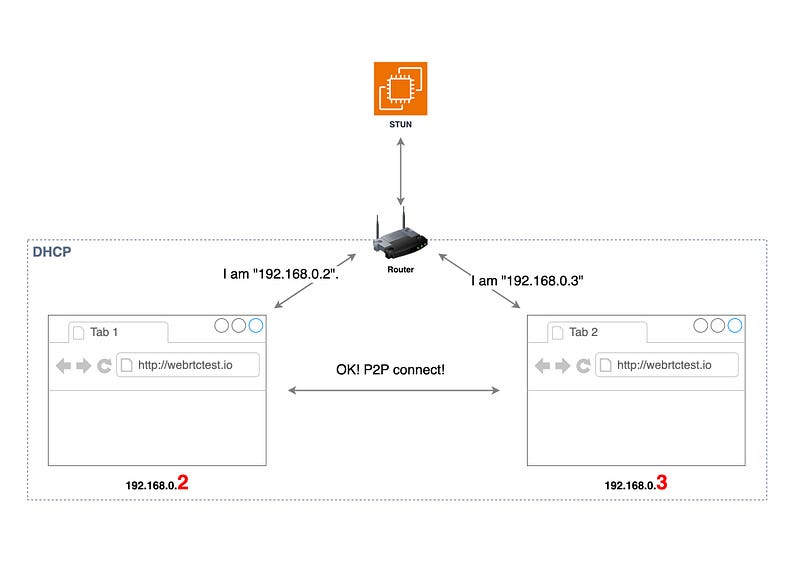
Since the devices were on the same network, they could establish a P2P connection using the STUN server. However, if a device was on a completely different network — such as one using mobile data — STUN might not work.
There are several reasons why STUN may fail. For example, it doesn’t work with symmetric NAT, and in some cases, mobile carriers might block STUN. Additionally, various factors like NAT configurations, firewalls, or other network restrictions can prevent it from functioning properly.
So whether it was due to mobile data or being on a different network, I couldn’t pinpoint the exact reason at the time. But when STUN wasn’t an option, TURN should have been used instead. Unfortunately, due to a missing configuration in Coturn, the TURN server couldn’t be located.
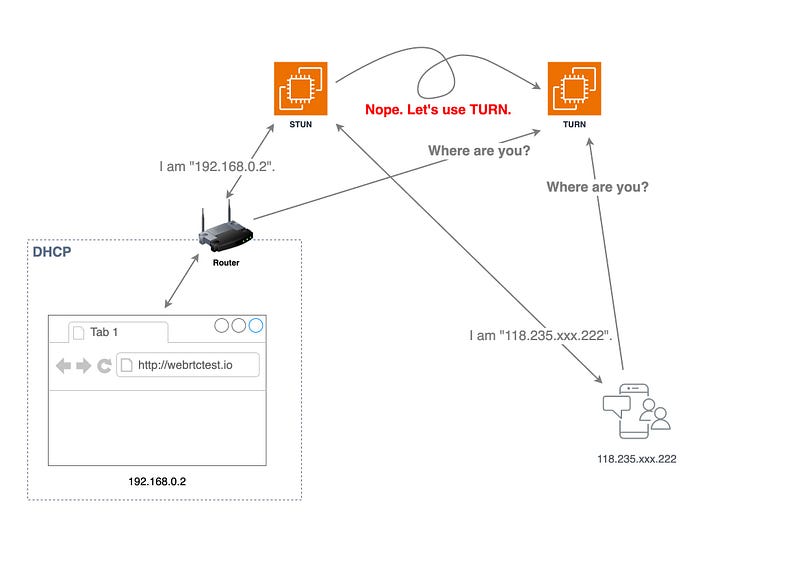
Even though the Coturn EC2 server was set up in a public subnet, TURN was not working or accessible. The reason lies in AWS EC2’s network architecture and symmetric NAT.
Considerations for Setting Up a TURN Server on AWS EC2
When configuring a TURN server (Coturn) on AWS EC2, additional setup is required compared to standard environments. Since EC2 instances do not directly bind to public IP addresses and operate behind NAT, specific configurations must be applied to ensure proper WebRTC functionality.
-
Coturn external-ip configuration is required
-
TURN-related ports must be opened in the security group
-
VPC and subnet settings must be verified
-
Elastic IP assignment must be checked
Among these, the external-ip configuration is the key in EC2.
Because of AWS EC2’s network architecture, instances do not recognize public IPs directly. Therefore, the Coturn configuration file (/etc/coturn/turnserver.conf) must explicitly specify the externally accessible public IP.
external-ip=<Public IP>/<Private IP>•
•
If this setting is missing, the TURN server may fail to return the correct IP address, leading to WebRTC P2P connection failures.
This is especially critical in mobile networks or symmetric NAT environments, where TURN relay is necessary. Without a properly configured external-ip, the TURN server may become unreachable.
Simply installing Coturn is not enough when setting up a TURN server on AWS EC2. Ensuring that the above configurations are correctly applied is essential to avoid WebRTC connection failures.
After then…
Without a solid understanding of computer science, I went through relentless troubleshooting. However, the key factors I needed to consider were clear:
• Cloud network architecture
• The difference between how STUN and TURN protocols work
Had I fully understood these two concepts at the time, it wouldn’t have taken me long time to resolve the issue.
Looking at the wealth of WebRTC guides and tutorials available today, I can’t help but reflect on those struggles. It reminds me of returning to a place where I once built something under tough conditions, only to find it later rebuilt in a much more refined and efficient way.
With well-documented official resources and a growing number of troubleshooting cases, WebRTC implementation has become more accessible than ever. For all the “adventurers” taking on this challenge, I send my support — keep pushing forward!