“Please Don’t Erase My Image, kubelet!”: Operating Kubernetes in a Closed Network
“This happened recently when we were migrating an existing Docker Compose-based application architecture to Kubernetes. The system we were building had to be deployed inside a hospital’s closed network, which meant no internet access at all. We converted the application to containerd images and manually uploaded them to each node. But before long, those images mysteriously started disappearing — turns out, kubelet was deleting them.”
Overview: Disappearing Images in Air-Gapped Kubernetes
Running Kubernetes in an on-premise, air-gapped (closed network) environment presents unexpected challenges. Without access to external registries like Docker Hub, Quay, or GitHub Container Registry, we had to pre-build containerd images and manually distribute them to each node.
However, we soon encountered a problem: those uploaded images started vanishing. After some digging, we discovered the culprit — kubelet’s image garbage collection mechanism.
We managed to mitigate the issue by tweaking the --image-gc-high-threshold and --image-gc-low-threshold settings to reduce how often GC kicks in, and by explicitly setting imagePullPolicy: Never. Still, the incident pushed us to better understand how kubelet works and how to adapt its behavior for air-gapped environments.
What Is Kubelet?
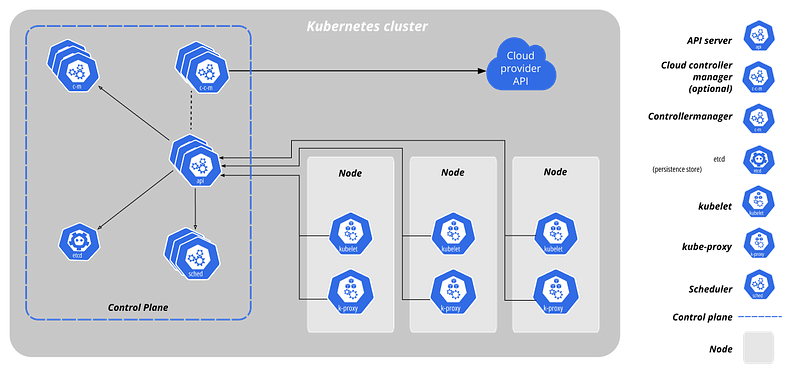
Components in a Kubernetes cluster (https://kubernetes.io/ko/docs/concepts/overview/components/)
Basic Concept
Kubelet is the agent that runs on each Kubernetes node. It communicates with the control plane to receive pod specifications and takes responsibility for making sure the described containers are running properly on the node.
Behind the scenes, kubelet interacts with the container runtime (such as containerd or Docker) to create, start, monitor, and clean up containers as needed.
In simpler terms, kubelet is the “node manager” that ensures all assigned pods are healthy and compliant with what the control plane expects.
Purpose and Responsibilities
Here’s a breakdown of what kubelet does:
- Receiving and launching pods: It pulls pod specs from the API server and ensures those containers are running.
- Managing container health: It constantly checks the status of running containers and decides whether to restart them.
- Handling probes: Kubelet runs
livenessandreadinessprobes to determine application health and availability. - Managing images: It pulls images when needed and cleans up unused ones to free disk space.
- Local resource management: It monitors node-level CPU, memory, and disk usage to make scheduling decisions locally.
We need to pay attention to the part, “cleans up unused ones to free disk space”
Characteristics and Side Effects
Kubelet is optimized for cloud-native environments. It assumes two key things:
- Container images can always be re-downloaded from a registry.
- Disk space is a limited resource, and unused images should be garbage collected to avoid running out of space.
These assumptions work well in typical cloud setups, but in air-gapped environments, kubelet’s “helpful” cleanup behavior can be disruptive — even dangerous.
Common failure scenarios include:
- Images are deleted, and since
imagePullPolicy: IfNotPresentdoesn’t trigger a pull in a closed network, the pod fails silently. - With
imagePullPolicy: Never, if the local image is gone, the pod simply won’t start.
In short, kubelet’s automation can sometimes be a little too helpful, acting beyond the operator’s intentions — and causing serious issues in restricted environments.
containerd and Image Deletion
When using containerd as the runtime, kubelet delegates image management tasks to containerd. That includes pulling images and, critically, deleting them.
The problems we ran into stem from this:
- If kubelet thinks disk usage is too high or that an image hasn’t been used recently, it may instruct containerd to remove it.
- In an air-gapped environment, there’s no way to re-pull the deleted image.
- Even with
imagePullPolicy: IfNotPresent, if the image is gone, the pod won’t recover.
This becomes a serious issue in environments like hospitals, military systems, or financial institutions where external internet access is blocked.
So, what on earth can I do?
(Hmm…) Tweak Kubelet’s GC Policy
You can control kubelet’s image garbage collection behavior using these flags:
--image-gc-high-threshold=100
--image-gc-low-threshold=95high-threshold: When disk usage exceeds this value, GC kicks in.low-threshold: After GC, kubelet tries to bring disk usage down to this value.
By setting these values high (e.g., 100/95), GC rarely occurs, which helps prevent premature image deletion.
Also, explicitly set imagePullPolicy: Never in your pod specs to stop kubelet from trying to pull missing images:
containers:
  - name: app
    image: myapp:1.0
    imagePullPolicy: Never
(Recommended!) Deploy an Internal Image Registry
Eventually, disk space will become an issue no matter how you tune GC. The more sustainable approach is to run a private image registry within the closed network.
Popular options include:
Harbor: Rich feature set including authentication and role-based access control.registry:2: Simple and lightweight Docker registry.Sonatype Nexus,JFrog Artifactory: Support for multiple package types.
Once deployed, simply point your image references to the internal registry:
image: internal-registry.local/myapp:1.0
imagePullPolicy: IfNotPresent
This way, even if kubelet deletes a local image, it can still be re-pulled — as long as the registry is available.
(Additional) Immutable Tags, Caching, and Hooks
Here are a few more strategies to increase resilience:
- Avoid mutable tags like
:latest. Use immutable, versioned tags like:1.0.1. - Use initContainers to pre-check if essential images are present.
- Add lifecycle hooks to restore missing images or log alerts when expected resources are missing.
Final Thoughts
Kubelet is a powerful and essential component in Kubernetes — but in specialized environments like air-gapped clusters, it can behave in ways that catch operators off guard.
Understanding how kubelet thinks and acts is key to building a stable and predictable Kubernetes setup in such environments. Hopefully, this post helps anyone in a similar situation avoid hours of head-scratching when their carefully placed images suddenly vanish into thin air.